

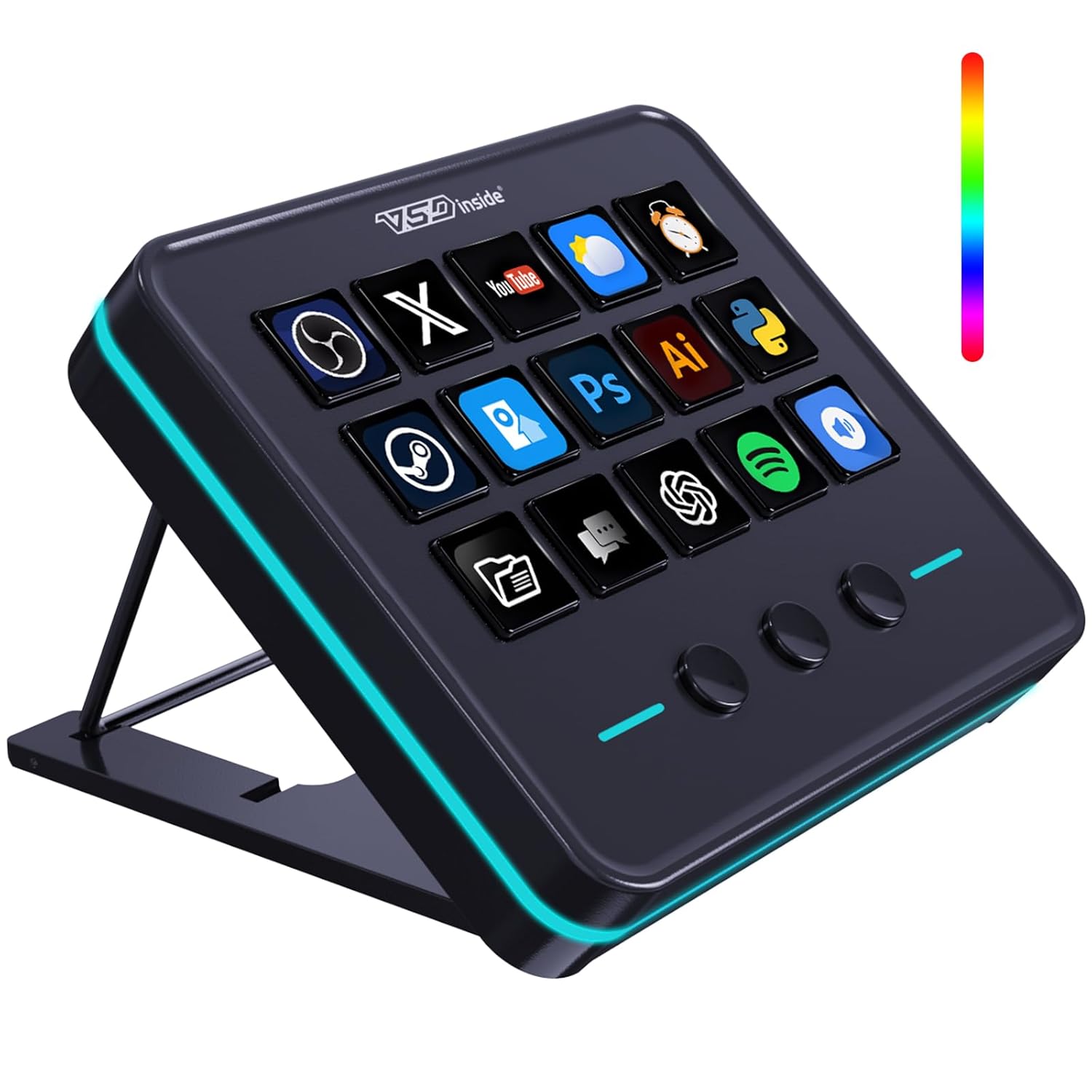
For gamers, streamers, and creative professionals, having seamless control over your workflow can significantly elevate your productivity and streaming quality. The VSDINSIDE Macro Keypad, a versatile stream controller deck, promises to boost efficiency with its customizable shortcut keys and AI-powered features. Priced at $59.99, this 18-key programmable device aims to serve as a multifaceted tool for live streaming, video editing, gaming, and beyond. Here, we dive into the essential aspects of this product to help you decide if it’s the right addition to your desk setup.

Key Features
-
18 Programmable Keys (15 LCD + 3 Buttons): The centerpiece of the VSDINSIDE Macro Keypad, these fully customizable keys allow users to assign macros, shortcuts, and commands with ease. Each LCD key supports custom images and animations (JPG, PNG, GIF), improving workflow memorization and recognition, making complex sequences more manageable with a single press.
-
Surrounding RGB Light Ring: This feature not only enhances your desktop aesthetics but also supports automatic color cycling and customizable static colors. The ambient lighting can complement your gaming setup or workspace lighting conditions, contributing to an immersive environment.
-
One-Touch Operation: Whether you want to switch OBS scenes, launch apps, input text, or control sound effects, this device simplifies multiple actions into quick one-touch commands. Such design is invaluable for live streamers or professionals who need rapid and reliable control.
-
One-Click Multi-Hotkey Macro Pad: Designed for executing multiple macros simultaneously or sequenced, this feature helps streamline game combos, video edits, music productions, and more, empowering users to automate complex workflows effectively.
-
Wide Compatibility: The USB-C connected keypad works seamlessly with Windows 11+ and macOS 14.0+, integrating easily with popular software such as OBS, Streamlabs, YouTube, Discord, and creative tools like Photoshop and Final Cut Pro.
-
Premium Quality & Versatile Plugins: Despite its affordable price, the VSDINSIDE boasts high-grade materials and rigorous QC testing. It also offers useful plugins like schedule reminders, a clock, stopwatch, weather updates, and calendar functions, turning it into a desktop companion beyond just stream control.
Pros & Cons
Pros:
- Affordable Excellence: Compared to market leaders, VSDINSIDE provides comparable features at nearly half the cost, making it an accessible choice for budget-conscious users without sacrificing quality.
- Customizable Visual Interface: The ability to personalize keys with custom images and animations enhances usability and speed.
- Efficient Workflow Enhancer: Reviewers frequently praise the keypad’s role in speeding up streaming setups and multitasking, giving the experience a professional edge.
- Responsive Customer Support: With 24/7 mail and Discord assistance, VSDINSIDE actively engages with community feedback to improve the device continuously.
- Versatile Use Cases: Goes beyond streaming into video/photo editing, office applications, and productivity tasks.
Cons:
- Initial Setup Learning Curve: Some users mention that configuring macros and integrations takes time to master, especially for newcomers.
- Software Updates & Bugs: While updates improve functionality, occasional minor bugs and connectivity troubles have been reported, though they are generally resolved swiftly by the support team.
- No Wireless Option: The product requires a USB-C cable connection, which might limit portability or neatness for some desk setups.
Who Is It For?
The VSDINSIDE Macro Keypad is ideally suited for:

- Live Streamers and Content Creators: Users seeking fast, reliable control during live sessions on platforms like Twitch and YouTube.
- Gamers: Those wanting to execute game combos or toggles without complex keyboard commands.
- Professional Editors & Designers: Video, photo, or music editors who benefit from customized shortcuts within software like Final Cut, Lightroom, Photoshop, or audio tools.
- Office Professionals & Power Users: People managing extensive daily workflows in apps like Excel, Word, and communication tools who want to optimize repetitive tasks.
Final Thoughts
The VSDINSIDE Macro Keypad stands out as a compelling option for anyone looking to enhance their control and efficiency in streaming, gaming, and creative work. Its combination of customizable keys, visual feedback, and versatile compatibility packs a punch at an affordable price point of $59.99. While the initial setup may require some time investment, the long-term benefits in streamlined workflows and instant command execution make it a worthy tool.
Unlock Your Streaming Potential with VSDINSIDE!
Transform Your Setup – Explore the Macro Keypad!
With its thoughtful design, responsive support, and regular software upgrades, the VSDINSIDE Macro Keypad offers more than just a set of buttons—it acts as a personalized assistant for your digital tasks. If you’re eager to unlock your streaming potential or upgrade your productivity arsenal, this macro keypad is well worth considering.
Get Streamlined with Our Customizable Keypad!
As an Amazon Associate, I earn from qualifying purchases.